



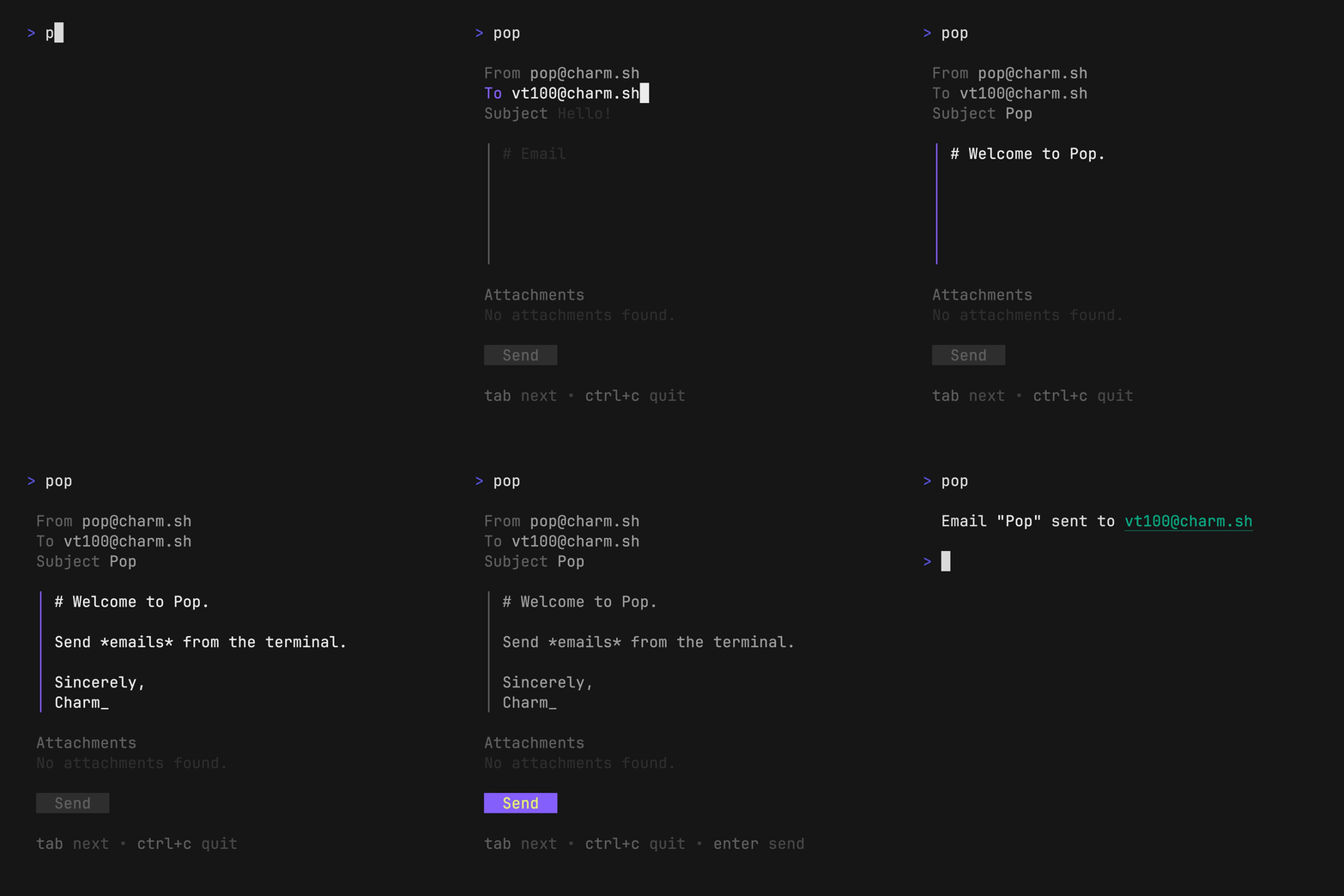
 ## Text-based User Interface
Launch the TUI
```bash
pop
```
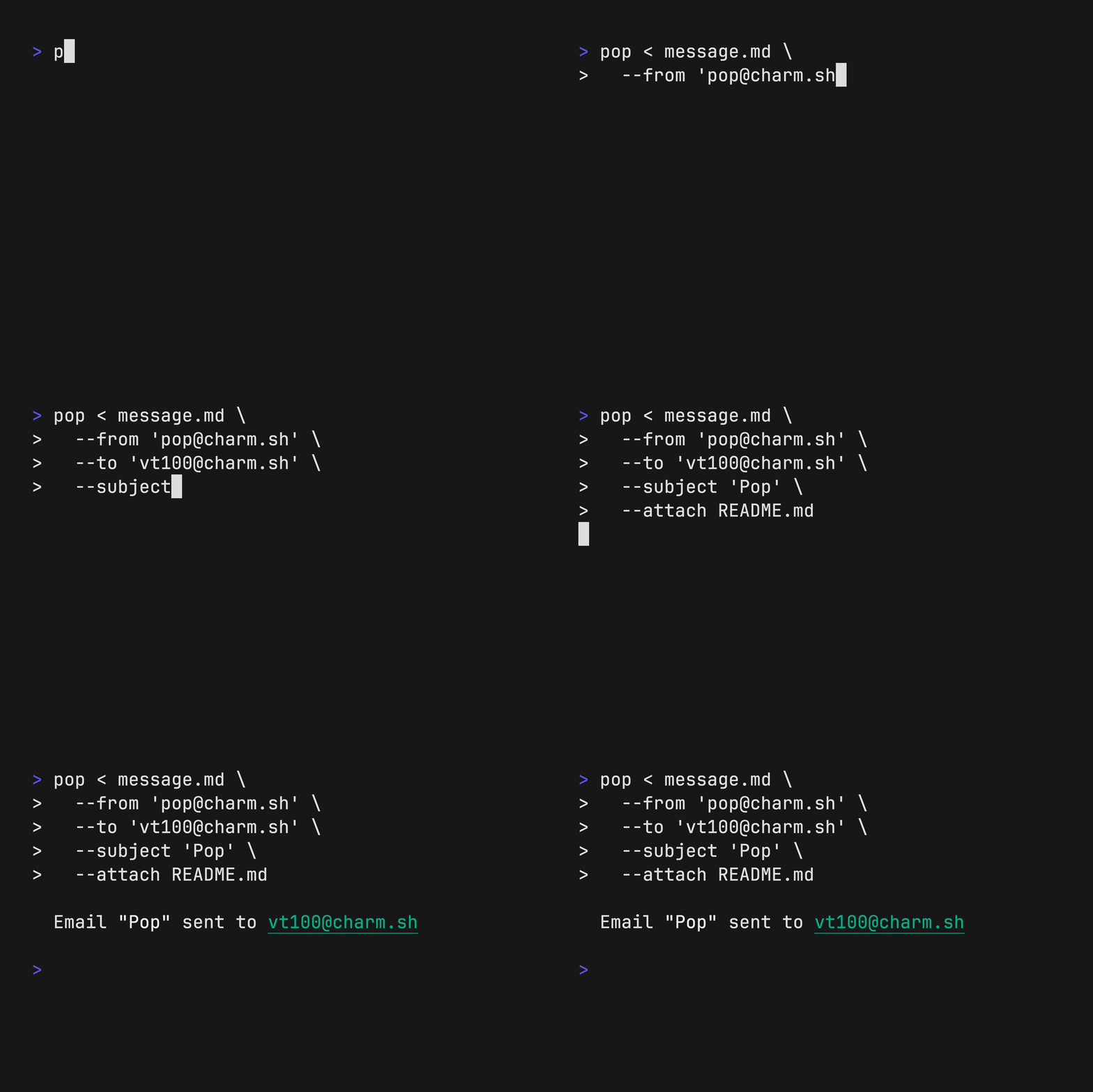
## Command Line Interface
```bash
pop < message.md \
--from "me@example.com" \
--to "you@example.com" \
--subject "Hello, world!" \
--attach invoice.pdf
```
## Text-based User Interface
Launch the TUI
```bash
pop
```
## Command Line Interface
```bash
pop < message.md \
--from "me@example.com" \
--to "you@example.com" \
--subject "Hello, world!" \
--attach invoice.pdf
```
 ---
---
 To use `pop`, you will need a `RESEND_API_KEY` or configure an
[`SMTP`](#smtp-configuration) host.
You can grab one from: https://resend.com/api-keys.
### Resend Configuration
To use the resend delivery method, set the `RESEND_API_KEY` environment
variable.
```bash
export RESEND_API_KEY=$(pass RESEND_API_KEY)
```
### SMTP Configuration
To configure `pop` to use `SMTP`, you can set the following environment
variables.
```bash
export POP_SMTP_HOST=smtp.gmail.com
export POP_SMTP_PORT=587
export POP_SMTP_USERNAME=pop@charm.sh
export POP_SMTP_PASSWORD=hunter2
```
### Environment
To avoid typing your `From: ` email address, you can also set the `POP_FROM`
environment to pre-fill the field anytime you launch `pop`.
```bash
export POP_FROM=pop@charm.sh
export POP_SIGNATURE="Sent with [Pop](https://github.com/charmbracelet/pop)!"
```
> **Note**:
> If you wish to use a resend account without a custom domain, you can use
> `onboarding@resend.dev` to send emails.
## Installation
Use a package manager:
```bash
# macOS or Linux
brew install pop
# Nix
nix-env -iA nixpkgs.pop
# Arch (btw)
yay -S charm-pop-bin
```
Install with Go:
```sh
go install github.com/charmbracelet/pop@latest
```
Or download a binary from the [releases](https://github.com/charmbracelet/pop/releases).
## Examples
Pop can be combined with other tools to create powerful email pipelines, such as:
- [`charmbracelet/mods`](https://github.com/charmbracelet/mods)
- [`charmbracelet/gum`](https://github.com/charmbracelet/gum)
- [`maaslalani/invoice`](https://github.com/maaslalani/invoice)
### Mods
Use [`mods`](https://github.com/charmbracelet/mods) with `pop` to write an email body with AI:
> **Note**:
> Use the `--preview` flag to preview the email and make changes before sending.
```bash
pop <<< "$(mods -f 'Explain why CLIs are awesome')" \
--subject "The command line is the best" \
--preview
```
To use `pop`, you will need a `RESEND_API_KEY` or configure an
[`SMTP`](#smtp-configuration) host.
You can grab one from: https://resend.com/api-keys.
### Resend Configuration
To use the resend delivery method, set the `RESEND_API_KEY` environment
variable.
```bash
export RESEND_API_KEY=$(pass RESEND_API_KEY)
```
### SMTP Configuration
To configure `pop` to use `SMTP`, you can set the following environment
variables.
```bash
export POP_SMTP_HOST=smtp.gmail.com
export POP_SMTP_PORT=587
export POP_SMTP_USERNAME=pop@charm.sh
export POP_SMTP_PASSWORD=hunter2
```
### Environment
To avoid typing your `From: ` email address, you can also set the `POP_FROM`
environment to pre-fill the field anytime you launch `pop`.
```bash
export POP_FROM=pop@charm.sh
export POP_SIGNATURE="Sent with [Pop](https://github.com/charmbracelet/pop)!"
```
> **Note**:
> If you wish to use a resend account without a custom domain, you can use
> `onboarding@resend.dev` to send emails.
## Installation
Use a package manager:
```bash
# macOS or Linux
brew install pop
# Nix
nix-env -iA nixpkgs.pop
# Arch (btw)
yay -S charm-pop-bin
```
Install with Go:
```sh
go install github.com/charmbracelet/pop@latest
```
Or download a binary from the [releases](https://github.com/charmbracelet/pop/releases).
## Examples
Pop can be combined with other tools to create powerful email pipelines, such as:
- [`charmbracelet/mods`](https://github.com/charmbracelet/mods)
- [`charmbracelet/gum`](https://github.com/charmbracelet/gum)
- [`maaslalani/invoice`](https://github.com/maaslalani/invoice)
### Mods
Use [`mods`](https://github.com/charmbracelet/mods) with `pop` to write an email body with AI:
> **Note**:
> Use the `--preview` flag to preview the email and make changes before sending.
```bash
pop <<< "$(mods -f 'Explain why CLIs are awesome')" \
--subject "The command line is the best" \
--preview
```
 - [`charmbracelet/mods`](https://github.com/charmbracelet/mods)
### Gum
Use [`gum`](https://github.com/charmbracelet/gum) with `pop` to choose an email to send to and from:
```bash
pop --from $(gum choose "vt52@charm.sh" "vt78@charm.sh" "vt100@charm.sh")
--to $(gum filter < contacts.txt)
```
- [`charmbracelet/mods`](https://github.com/charmbracelet/mods)
### Gum
Use [`gum`](https://github.com/charmbracelet/gum) with `pop` to choose an email to send to and from:
```bash
pop --from $(gum choose "vt52@charm.sh" "vt78@charm.sh" "vt100@charm.sh")
--to $(gum filter < contacts.txt)
```
 - [`charmbracelet/gum`](https://github.com/charmbracelet/gum)
### Invoice
Use [`invoice`](https://github.com/maaslalani/invoice) with `pop` to generate and send invoices entirely from the command line.
```bash
FILENAME=invoice.pdf
invoice generate --item "Rubber Ducky" --rate 25 --quantity 2 --output $FILENAME
pop --attach $FILENAME --body "See attached invoice."
```
- [`charmbracelet/gum`](https://github.com/charmbracelet/gum)
### Invoice
Use [`invoice`](https://github.com/maaslalani/invoice) with `pop` to generate and send invoices entirely from the command line.
```bash
FILENAME=invoice.pdf
invoice generate --item "Rubber Ducky" --rate 25 --quantity 2 --output $FILENAME
pop --attach $FILENAME --body "See attached invoice."
```
 - [`maaslalani/invoice`](https://github.com/maaslalani/invoice)
## Feedback
We’d love to hear your thoughts on this project. Feel free to drop us a note!
- [Twitter](https://twitter.com/charmcli)
- [The Fediverse](https://mastodon.social/@charmcli)
- [Discord](https://charm.sh/chat)
## License
[MIT](https://github.com/charmbracelet/pop/blob/main/LICENSE)
---
Part of [Charm](https://charm.sh).
- [`maaslalani/invoice`](https://github.com/maaslalani/invoice)
## Feedback
We’d love to hear your thoughts on this project. Feel free to drop us a note!
- [Twitter](https://twitter.com/charmcli)
- [The Fediverse](https://mastodon.social/@charmcli)
- [Discord](https://charm.sh/chat)
## License
[MIT](https://github.com/charmbracelet/pop/blob/main/LICENSE)
---
Part of [Charm](https://charm.sh).
 Charm 热爱开源 • Charm loves open source